How to Check Mutual Fund KYC Status Online
By Aviral Singh
About the Author
Aviral Singh is an MBA student at IIM Guwahati and a CSIR NET (JRF) qualifier with an M.Sc. from Hansraj College. A former Physics Wallah educator, he creates content on campus life and writes on finance, investments, businesses and education.
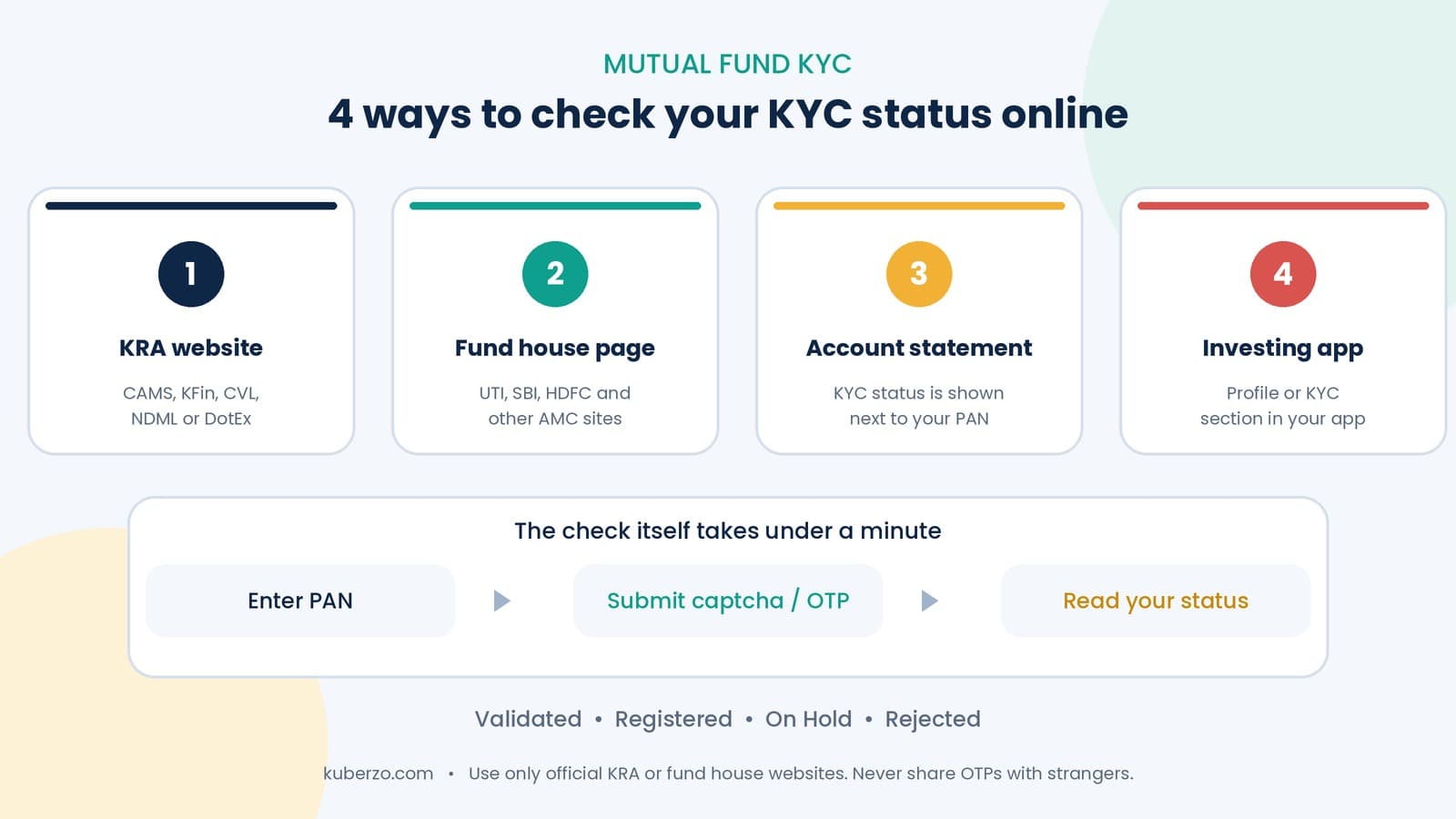
How to check mutual fund KYC status online with your PAN: four easy methods, step-by-step instructions for UTI Mutual Fund, what each status means and how to fix problems.
The direct answer: you can check your mutual fund KYC status online in under a minute using only your PAN. Enter it on any SEBI-registered KRA website (CAMS, KFin, CVL, NDML or DotEx), on a fund house or RTA “KYC status” page, or in your investing app. Your status will show as Validated, Registered, On Hold or Rejected.
Why should you check your mutual fund KYC status?
A valid KYC is required before you can invest. If your status is not fully validated, new investments with a new fund house can be delayed, and an On Hold status can pause transactions. Checking before a big investment saves you from last-minute surprises.
What do you need before you check?
Your 10-digit PAN
A device with internet access
Your Aadhaar-linked mobile number, in case an OTP is needed
That is all. You do not need a folio number or any investment to check your status.
4 ways to check KYC status of a mutual fund
Method | Where | Best for |
|---|---|---|
KRA website | CAMS KRA, KFin KRA, CVL KRA, NDML KRA, DotEx KRA | The most direct check, works for any PAN |
Fund house or RTA page | AMC site such as UTI, SBI, HDFC or an RTA like CAMS or KFin | Checking while already on your fund house’s site |
Account statement | Statement of Account or CAS | Seeing KYC status next to your PAN without logging in anywhere new |
Investing app | Profile or KYC section | Quick check from your phone |
Method 1: How to check KRA KYC status on a KRA website
Open the official website of a SEBI-registered KRA.
Go to “KYC Inquiry” or “KYC Status”.
Enter your 10-digit PAN and the captcha.
Click Submit.
Your status appears on screen as KYC Validated, KYC Registered, KYC On Hold or KYC Rejected.
Any one KRA is enough, because they exchange data. You do not need to check all five.
Method 2: How to check KYC status through a fund house or RTA website
Most fund houses and RTAs show a “KYC Status” link on their investor pages.
Visit the website of any fund house where you invest, or an RTA website.
Click “KYC Status” or “Check KYC”.
Enter your PAN and any captcha or OTP asked.
Read your status. If it is On Hold or Rejected, the page usually also shows the reason.
How to check KYC status in UTI Mutual Fund
UTI Mutual Fund has a dedicated Digital KYC page on its website.
Go to the Digital KYC section on utimf.com.
Click the “To check your KYC status click here” link on that page.
Enter your PAN and submit.
Your KYC status is displayed.
If your KYC is not complete, the same UTI page lets you start Digital KYC online: you enter your PAN, name and date of birth as per PAN, upload documents and authenticate with an Aadhaar OTP. For KYC queries you can also contact UTI Mutual Fund’s helpline listed on that page. Keep your Aadhaar and PAN handy and use the mobile number linked with Aadhaar.
Method 3: How to check KYC status on your account statement
Your mutual fund Statement of Account shows your PAN in masked form along with your KYC status. A status such as “Complied”, “Verified” or “Completed” means you can invest without restriction. If it is missing or says otherwise, check your status on a KRA website to confirm.
Method 4: How to check KYC status in an investing app
Many investing apps show KYC status in the profile or KYC section.
Open the app and log in.
Go to Profile, Account or KYC.
Look for KYC Status.
App screens change often. If you cannot find it, use a KRA website instead, which is the source of truth.
What does your KYC status mean?
Status | Meaning | What to do |
|---|---|---|
KYC Validated | Fully verified | Nothing. You can invest in any fund |
KYC Registered | Basic KYC done, not fully validated | Upgrade to Validated using PAN and Aadhaar (eKYC) |
KYC On Hold | A problem was found | Fix the reason shown and resubmit |
KYC Rejected | Verification failed | Correct the issue and apply again |
A Registered status usually lets you continue existing SIPs and top-ups with fund houses you already invest in, but a new fund house may ask for fresh KYC.
What if you can’t find your KYC status?
Check your PAN digits. A single typo shows “no record”.
Try another KRA or fund house page. A different website may respond faster.
Your KYC may not exist yet. If you’ve never invested or opened a demat account, complete KYC first.
Wait a few hours if you’ve just completed KYC. KRA updates can take time.
How to fix an On Hold or Rejected status
Common reasons are PAN not linked with Aadhaar, an unverified mobile number or email, or document errors. Open the fund house or RTA page where you checked, read the reason, correct it (for example, link PAN with Aadhaar or verify your mobile and email), and resubmit. Once the KRA updates your record, your status changes to Registered or Validated.
Quick checklist for safe KYC checks
Use only official KRA, fund house or RTA websites.
Never share OTPs, passwords or documents with unknown callers or links.
Don’t pay anyone to check your KYC status. The check is free.
Check your status once or twice a year, and before large investments.
Common mistakes while checking KYC status
Mistake 1: Using unofficial websites. They can misuse your data.
Mistake 2: Assuming “Registered” is the same as “Validated”. It may fail for a new fund house.
Mistake 3: Entering a wrong PAN. It will show no record.
Mistake 4: Ignoring an On Hold status. It can pause your SIPs or redemptions.
Mistake 5: Leaving the check until redemption day. Check early.
Mistake 6: Not updating your mobile and email. Outdated details cause verification to fail.
So, what should you do next?
Pick the easiest method, enter your PAN and read your status. If it says Validated, you’re ready to invest. If not, fix it first. The process is quick and usually free.
If you’re ready to start, Kuberzo’s SIP vs Lump Sum guide and Kuberzo’s Goal Based Planner can help you decide how to invest, and Contact us for personalised guidance.
Financial disclaimer
This article is for general education and does not constitute personal investment or tax advice. KYC rules and procedures are set by SEBI and can change; check the official KRA or fund house website for the latest requirements. Website and app screens may change. Mutual fund investments are subject to market risks; read all scheme-related documents carefully.
Frequently Asked Questions
How do I check my mutual fund KYC status online?
Enter your PAN on any SEBI-registered KRA website, a fund house or RTA KYC status page, or in your investing app. Your status appears instantly.
Is checking KYC status free?
Yes. Checking is free on official KRA and fund house websites.
How do I check KYC status in UTI Mutual Fund?
Go to the Digital KYC page on utimf.com, click the KYC status link, enter your PAN and submit.
Which KRA should I use to check my status?
Any one. SEBI-registered KRAs share data, so one check is enough.
What does KYC On Hold mean?
A problem was found with your KYC, such as PAN not linked to Aadhaar or unverified mobile or email. Fix it and resubmit.
Can I invest if my KYC is Registered?
You can usually continue investing with fund houses where you already hold investments, but a new fund house may ask you to complete KYC again or upgrade to Validated.